




Good News: A new version of Autokit has been released! Carlinkit CPC200 CCPA supports both wireless Carplay and wireless Android Auto.
✅ Wireless CarPlay
Integrate your iPhone with your vehicle and enjoy CarPlay, Mirrorlink, and more. Make your Android screen compatible with wireless Apple CarPlay.

✅ Wireless Android Auto
Integrate your Android phone with your vehicle. Discover the safe to use your Android phone apps by connecting your phone to your vehicle.

✅ Say Goodbye to Phone Mounts
Enhance your aftermarket Android head unit with the CPC200-CCPA. It allows you to use map navigation and music apps on your car's screen without having to touch your phone.

✅ Auto Connection
After connecting for the first, Carlinkit CCPA dongle will automatically connect your phone when the car starts.

✅ More Features

✅ Carlinkit CCPA vs CCPA-MIC

Note :
1. If you use Carplay and Android Auto in the Aftermarket Android Head Unit. You can use this CPC200-CCPA. It's specially made for Android head unit, which is suitable for model system versions above Android 4.4+.
2. The CPC200-Autokit/ CPC200-CCPA requires the installation of the 'AutoKit.apk' on your Android Head Unit for full functionality. If you are unable to install the APK, the product will not work as intended.
3. If you use an iPhone and your vehicle supports Wired CarPlay or these Aftermarket Head-Units(Alpine/ Pioneer/ Kenwood...), you can choose the👉 Carlinkit U2W Plus (3.0/ 4.0).
4. If you enjoy using apps like Netflix or YouTube in your car, you deserve 👉Tbox Plus( Full Android 13.0 System) or Tbox Max. Covering a wider range of functions, compatible with iPhones and Android smartphones.
How to Use This Carlinkit USB Dongle?

CPC200-CCPA Parameters:
| Model | CPC200-CCPA |
| CPU | Atmel AT91SAM9260 |
| WiFi Module | Realtek 8822BS/Broadcom 4354S |
| Power Input | 5V±0.2V⎓1.0A |
| Power Consumption | 0.75W |
| WiFi Frequency | 5150-5250MHz, 5725-5850MHz |
| Bluetooth Frequency | 2412-2472MHz |
| Antenna | 3 dbi built-in FPC ANTENNA |
| Material | ABS+PC |
| Color | Black |
| Surface Treatment | Frosted |
| Pressing Method | Ultrasonic casting |
| Compatible iPhone | iPhone 6 or above, iOS 10 or above |
| Compatible Android phone | Android 9.0 or above, some Android phones require Android 11.0 and above |
| Compatible Car | Android 4.4 and above system versions |
| Resolution | Adaptive (maintain the original protocol resolution) |
| Language | Automatically switch according to the vehicle language environment |
| Port | LED light、USB female port、USB male port |
| Product Size | 185*42*13mm |
| Package Dimensions | 230*90*35mm |
| Product Weight | 0.04kg |
| Packing Gross Weight | 0.08kg |
| Package List | Packing box*1, product*1, product manual*1 |


FAQs
Your car screen system is Android version because the Android system can install any app. including the "Autokit app".
(Install the Autokit app in the car; this is a prerequisite for using this product.)
1. Please make sure your car is Android 4.4 and above system.
2. Download the AutoKit application, and enter settings > environment testing. If all three options are displayed with “√”,
3. Your car can use a dongle.
Note: Not applicable to Aftermarket Head-Units Pioneer, Alpine, Kenwood!! Choose another product—Carlinkit USB Wireless Adapter Dongle for Wired CarPlay.
It supports iPhone 5 and above systems, like IOS 10 or more.It supports Android Auto feature phones.
Note: if your iPhone is iOS 5+ or above, please update AutoKit.apk to the latest version.
For the car having Android Navigation stereo, you can plug the dongle into your car USB port directly after installing the AutoKit on the car screen, and then connect the iPhone with the dongle and click AutoKit to go to the CarPlay interface.
For the car not having an Android Navigation stereo, you can plug the dongle into your Android Tablet after installing the AutoKit on the tablet(You should use a USB Adapter to keep the dongle from charging), then connect the iPhone with the dongle and click AutoKit to go to CarPlay interface.
Note: It's similar to Android Auto.
Please click here to download Autokit APK
Method 1: Download the APK on Car Browser.
1. Click the browser on the car, enter the URL, and download APK. (Your car must Connect to the Network.)
2. Click the “Download Directory” to find the downloaded APK file, then install it.
Method 2: Download the APK on your computer, copy it to a USB flash drive, and install it.
1. Enter the URL on your computer browser, download the APK, and copy it to a USB flash drive.
2. Insert the U disk into the USB interface of the car, find the U disk directory in the “File Manager”, then install it.
1. Insert the CarPlay Dongle into your car.
2. Turn on the Wifi and Bluetooth.
3. Searching the Bluetooth and then entering the pin (0000).
1. Upgrade APK:Unplug the dongle first, then enter the APK settings, find the "check upgrade" button, and you will see the prompt for the latest version. Then click update and the APK is updated.
2. Upgrade dongle:Plug in the dongle to the car, then enter the APK settings and find "check to upgrade", you will see the latest box version, and then click Update.
Upload log function: If there are still some minor problems after upgrading to the latest version, please upload the log. It will collect your use problems that occur when using Carplay. Our engineers will research the solution and add it to the next upgrade version so that we have the opportunity to solve this problem.
337 Excellent Reviews

I bought the unit to have Carplay in our new Leapmotor T03 2026 model. The unit arrived in a good protective packaging and the unit packaging is very protective. I just installed the unit and it is work perfectly with the car. I watched videos, how can you install the unit and the software on the car, but thanks to an upgrade in the car's software I guess the unit installed the software from itself to the car without any problems. Good product! Thank you guys for making it!
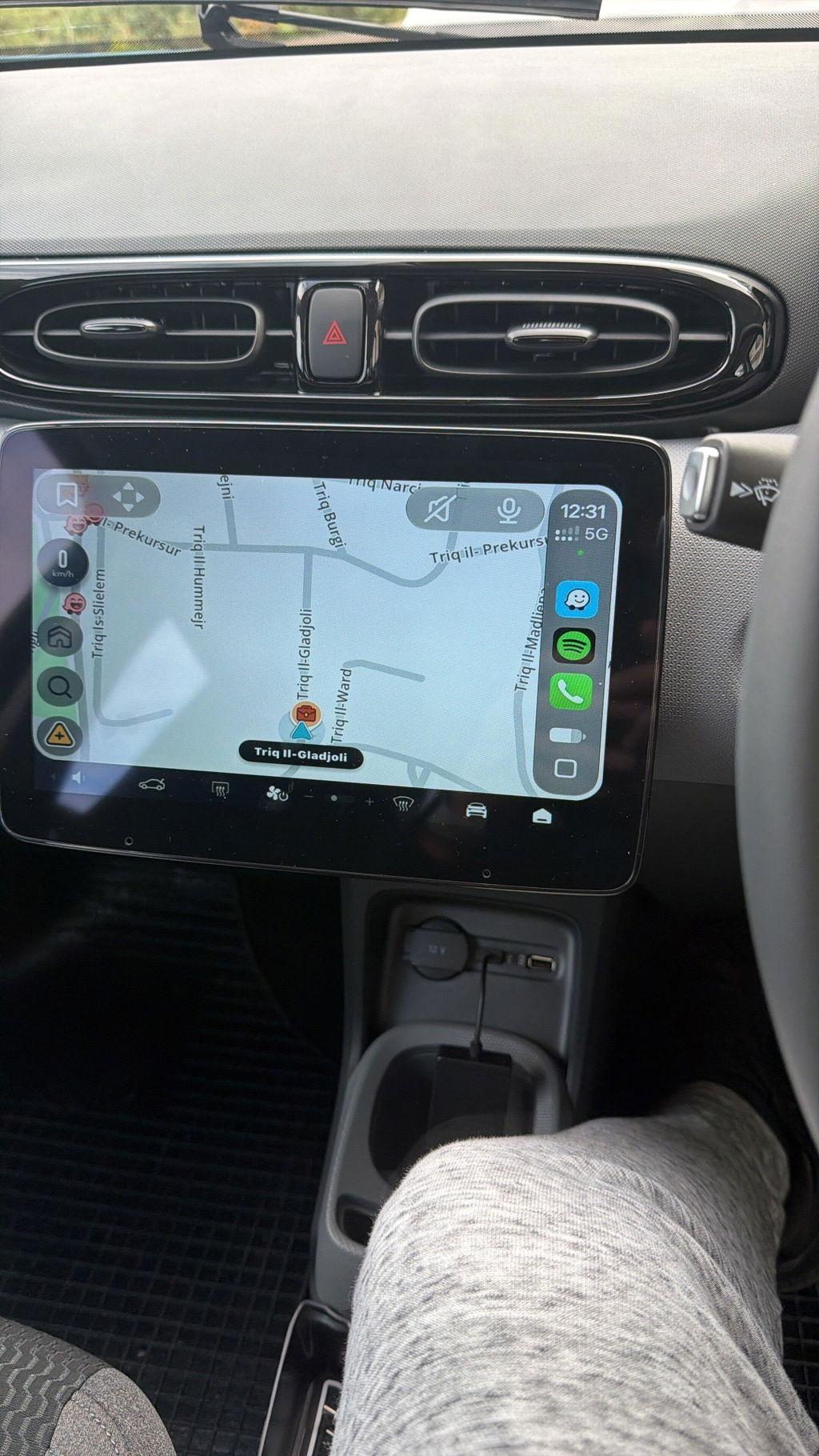
Thank you so much for the detailed review! We're delighted the CPC200-CCPA works perfectly in your new Leapmotor T03 2026. If you ever need help with firmware updates or have any questions, just reach out to us anytime — we're always happy to help.
If they don't send the refund because device was not working, I will contact Consumers Rights solicitors! very disappointed

I have BYD HAN 2024 Chinese version and I installed the apk file to car and attached the carlink adapter and working fine, issues with phone calls but connected Bluetooth to car multimedia and carlink using wifi and now working fine no lag

Thank you so much for sharing your detailed experience with your BYD HAN 2024 Chinese version!
We’re glad to hear the APK installation and Carlink adapter work perfectly for you.
It’s great that you solved the phone call issue by connecting Bluetooth to the car multimedia and using Wi‑Fi for Carlink — now with no lag at all!
Thank you for your support, and enjoy your smooth driving experience! 😊
Works perfectly on my Citroen C4 2006 with an aftermarket navigation system.


I ordered from India, product was delivered in 20 days, live tracking during entire time. Easy to setup and use. It works out of the box. saves a lot of money as we can convert our android player into carplay. Both wired and wireless works flawlessly, it takes approx 20 to 30 seconds to open after startup. so far so good. Have to see in long run how this goes, but It was worth it for the paid I paid.


The product is nice and works amazingly smooth.. good seller gives nice support throughout
I've been using wired version of this adapter for 2 month but considering specific ergonomic of my car there's no space for placing phone with cable, it brought me to buy wireless version.
And I'm happy because evetything works. I've replaced adapter and synchronised my phone with CarPlay only.
Separate point is fast delivery. I've got my stuff during two weeks of waiting.

Works amazing. Just what I was looking for my android aftermarket head unit.

Good product
Thank you so much for the 5-star review and for choosing Autokit! We're really glad to hear you're happy with the CPC200-CCPA. If you ever have any questions, feel free to reach out to us — we're always happy to help. Enjoy! 🚗
I did research and even watched a YT video about how to install it and troubleshoot. Did not need too. I had it running in a few minutes just by following the instructions. I happily recommend it to any other Leapmotor C10 owner.. and anyone really.
Thank you for the brilliant review — 'It just works' is exactly what we aim for! 😄
The setup really is just plug in, connect, and go. A few minutes is about the average, so you're right on track.
And thank you for recommending it to fellow Leapmotor C10 owners — the C10's factory head unit pairs beautifully with wireless CarPlay and Android Auto once this little dongle is in place. If you ever need firmware updates or have any questions down the road, our support team is always here.
(Autokit) CPC200-CCPA Wireless CarPlay Dongle for Aftermarket Android Head Unit
Thank you so much for the 5-star review! We hope the CPC200-CCPA is working great with your Android head unit.
If you ever have any questions or need help with the setup, our support team is always here for you.
It’s fantastic product and working really good
Hi, thank you so much for your wonderful review! We're thrilled to hear that you're enjoying the product and that it works well for you. If you have any questions or need assistance in the future, feel free to reach out. Enjoy your driving experience with your new wireless CarPlay dongle!
Easy installation
Running perfect
Thank you so much for your 5‑star review of the CPC200‑CCPA wireless CarPlay dongle! We’re delighted to hear installation was easy and the device is working perfectly for your aftermarket Android head unit.
Should you meet any issues in future use, please feel free to contact our support team anytime. Wish you a great driving experience!
Works as magic, Fast delivery
Thanks
Hi Gal, we're thrilled to hear you're happy with the product and our fast service! Thanks for your kind words and support.
I
Thank you so much for your 5-star review!
We’re glad to hear the dongle works great for you. Regarding steering wheel control compatibility, we want to explain that we cannot guarantee 100% compatibility with all aftermarket head units due to the wide variety of Android systems.
Our technical team keeps working hard to optimize the product and improve compatibility continuously. If you have further questions, please feel free to contact us anytime!
The build quality is good, and the setup process is very easy. It connects quickly and starts automatically every time. However, after receiving a phone call, the music always takes more than 3 minutes to resume, which is quite inconvenient. The song also occasionally lags for about half a second during playback. Overall, it is a good product, but the music resume time after calls needs significant improvement.
Thank you for your lovely review! We’re pleased the Carlinkit arrived quickly and in perfect condition. It makes us happy to know you love the product and our customer service. Enjoy your driving!
2nd one I have purchased and people being able to hear me on calls is a massive problem
Läuft wie es soll
(Autokit) CPC200-CCPA Wireless CarPlay Dongle for Aftermarket Android Head Unit
Hi there! Thank you for your feedback. We're glad you're satisfied with the Autokit CPC200-CCPA Wireless CarPlay Dongle. If you have any questions or need assistance, feel free to reach out. Enjoy your driving experience!
Hab’s bestellt funktioniert einwandfrei. ✌🏻🔥
Vielen Dank für Ihre tolle Bewertung! 😊
Wir freuen uns riesig zu hören, dass Ihr Carlink einwandfrei funktioniert. Ihr Feedback motiviert unser Team sehr und bedeutet uns wirklich viel. ✌🔥
Wir wünschen Ihnen viele sichere und unvergessliche Fahrten! ️
Mit freundlichen Grüßen,
Carlinkit Carplay team
Hi, I’ve been sent a faulty one that doesn’t light up or connect
(Autokit) CPC200-CCPA Wireless CarPlay Dongle for Aftermarket Android Head Unit
Thank you so much for your wonderful review! We're delighted to hear that the Autokit CPC200-CCPA Wireless CarPlay Dongle is working well with your aftermarket Android head unit.
Should you have any questions or need assistance in the future, please don't hesitate to reach out — we're always here to help.
Best Regards,
Carlinkit Carplay team
It doesn't work on my car
Works perfect in my Leapmotor C10. Installation took some time and had to look up extra info on youtube to get the Autokit App installed
Thank you for the great review! 😊 So glad it's working perfectly in your Leapmotor C10! We'll work on making the setup guide clearer — thanks for the helpful feedback! 🙏