

डिवाइस से कनेक्ट होने के बाद मैं डोंगल की भाषा कैसे बदलूं?

कारलिंकिट 3.0/ 4.0 में 13 भाषाएँ प्रदर्शित हैं, जिनमें पुर्तगाली, फ्रेंच, जर्मन, हिब्रू, रूसी, स्पेनिश, स्वीडिश, तुर्की, चीनी सरलीकृत, चीनी पारंपरिक, जापानी, कोरियाई और अंग्रेजी शामिल हैं।

कनेक्शन पृष्ठ पर, निचले दाएं कोने में ग्लोब आइकन पर क्लिक करें।

<मजबूत>1. डोंगल को कार के USB पोर्ट में डालें।प्लगइन, जब स्क्रीन का इंटरफ़ेस निम्न चित्र जैसा हो, तो आप Apple CarPlay से कनेक्ट करना शुरू कर सकते हैं।

1.Insert the product into the USB port of the car.

2. iPhone का वाईफाई और ब्लूटूथ चालू करें, लेकिन पहले किसी भी डिवाइस को कनेक्ट न करें। iPhone या कार के ब्लूटूथ इंटरफ़ेस पर उत्पाद के ब्लूटूथ सिग्नल को खोजें।
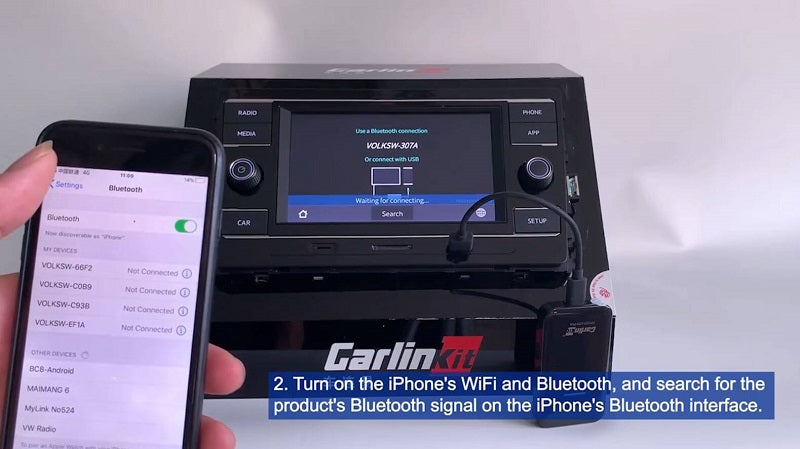
2.Turn on the iPones's WiFi and Bluetooth, and search for the product's Bluetooth signal on the iPhone's Bluetooth interface.

Select the iPhone’s Bluetooth signal in your car or search Bluetooth's  signal of car in iphone, connect to your iPhone. The name of bluetooth is the one which shows on the interface of CarPlay in the car.  carlinkitcarplay.com
3.डोंगल भाषा बदलने के लिए कोने के दाईं ओर नीचे ग्लोब बटन पर क्लिक करें।

संबंधित आलेख

Carlinkit Mini Ultra Smallest Wireless CarPlay Adapter Review
Table of Contents Is Carlinkit Mini Ultra the Smallest Wireless CarPlay Adapter? Key Features of the Carlinkit ...
    1 out of ...